Something has changed in how companies approach AI in their SAP landscapes. The exploratory phase is over: budgets now come with the expectation of results, and SAP has rebuilt its own story around the autonomous enterprise. What has not changed is the practical question underneath: which door do we walk through?
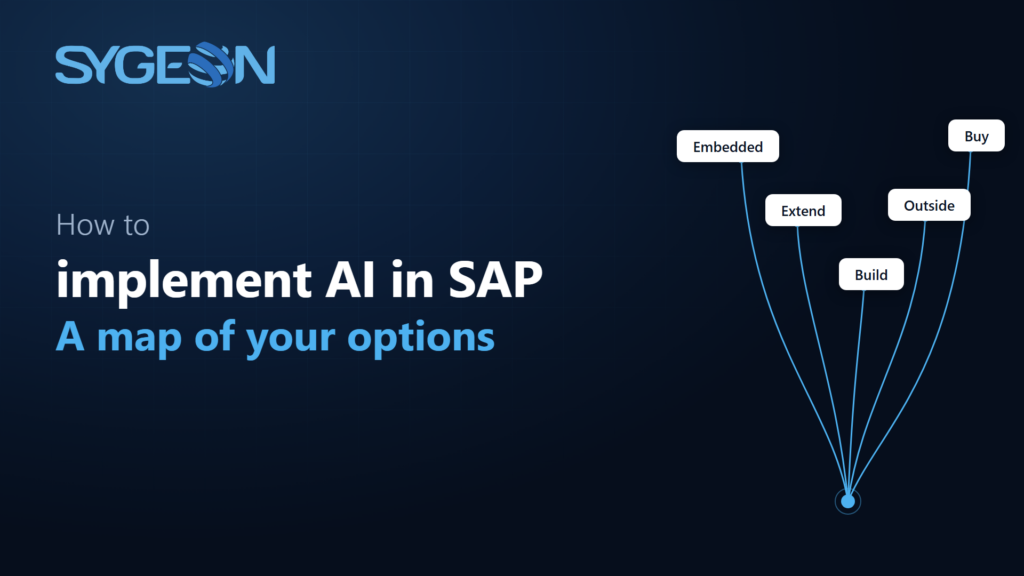
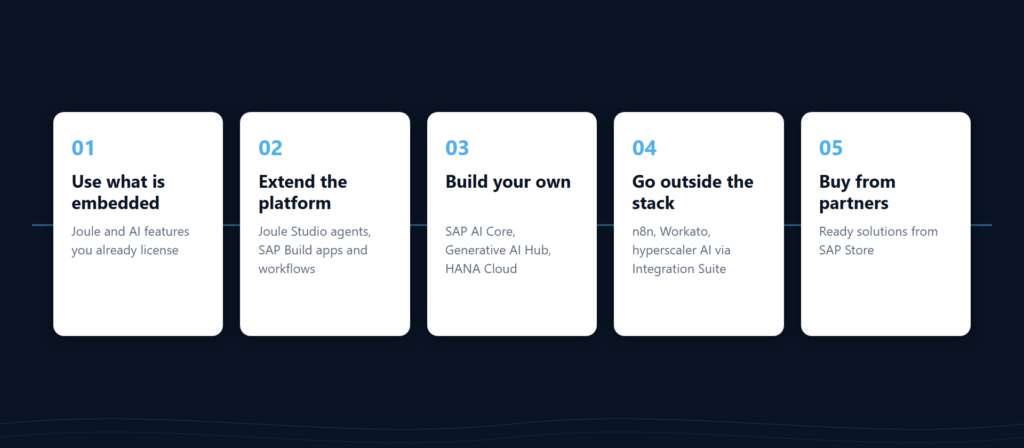
There are five ways to bring AI into an SAP landscape. Most of what is published describes only one of them, usually the one the publisher sells. What is missing is a map: the realistic routes side by side, what each costs in skills and governance, and where each one leads. This article is that map, and it opens a series that will walk each route in detail.
Most organizations will end up combining two or three of them, which is why the goal is orientation rather than a winner.
Route one: use what is already embedded
The fastest route is the AI you already license. Joule, SAP’s assistant, ships across S/4HANA Cloud, SuccessFactors, Ariba and the rest of the cloud portfolio. A growing set of embedded AI features sits directly inside business processes, from cash application in finance to the mapping assistant in SAP BTP services and developer tools. Activation is configuration work, sometimes only a few days of it.
The trade-off is control. Embedded AI does what SAP designed it to do, on SAP’s roadmap, priced through the AI Units model that deserves a careful read before anyone promises the board quick wins. This route works well as a starting point. For a specific business problem it usually stops a step short, which is where the next routes come in.
Route two: extend the platform
When embedded features stop short of your use case, the next route is building on SAP’s AI stack without leaving it. This is the territory of the SAP Business AI Platform: Joule Studio for custom agents and skills, SAP Build for the workflows and applications around them, with SAP carrying identity, access and grounding in business data.
Two honesty notes. The n8n canvas that SAP is embedding into Joule Studio as its workflow orchestration layer is targeted for general availability in Q3 2026 and, at the time of writing, has not arrived. And you do not have to wait for everything: a self-hosted n8n instance can be connected to your BTP already today or even deployed there as a container.
This route fits organizations that want custom AI with the platform carrying the governance load. The practical requirement is BTP skills in house, or a partner who brings them.
Route three: build your own
Some problems are specific enough that no configured agent will reach them. For those, SAP provides the machinery to run your own models and applications: SAP AI Core for deploying and operating AI workloads, the Generative AI Hub for governed access to foundation models, SAP HANA Cloud for vector search and grounding.
This is the most demanding route and the one with the highest ceiling. Data stays inside your BTP perimeter, the solution does exactly what your process needs, and the result is an asset rather than a subscription. The price is genuine engineering capacity: model operations, prompt evaluation, lifecycle management. That is why this route is usually the second or third step of an AI journey rather than the first.
Route four: go outside the stack
An honest map includes the roads that leave SAP territory: self-hosted n8n for teams that want the canvas without the platform, Workato for cross-application automation with AI steps, or hyperscaler AI services and direct API access to frontier models, stitched to SAP systems through SAP Integration Suite as the connective tissue.
There are good reasons to take this route: existing skills, existing licenses, use cases that live mostly outside SAP anyway. There are also two things to check before committing. The first is governance: outside the stack, the identity, audit and access controls that route two gives you by default become your job. The second is newer and less known: SAP’s API policy, updated in April 2026, explicitly restricts autonomous and generative AI systems that plan and execute sequences of API calls against SAP systems to SAP-endorsed pathways. Before committing to this route, check whether the planned pattern sits on an endorsed pathway, and what it would take to move it onto one.
Route five: buy from partners
The final route is the one enterprise IT knows best: someone has already built it. The SAP Store carries a growing catalog of partner-built AI solutions that deploy into your own BTP subaccount, which keeps data residency and procurement conversations mercifully short. We know this route from both sides, having shipped a product to SAP Store ourselves, built entirely through route three.
Buying makes sense when the problem is common enough that a product exists and specific enough that configuring Joule will not get you there. The evaluation questions are the classic ones: where does the data go, what happens at renewal, and who answers when it breaks.
How to actually choose
In practice, six questions decide most cases:
- Clean core. This is less about which route you pick and more about how the route touches the core. Every option can stay clean, provided it reaches the core through published APIs and released extension points.
- Data residency. Where do prompts, context and outputs physically go? Embedded and platform routes keep data within the SAP boundary; route four makes you draw the boundary yourself.
- Skills. Administration is enough for route one, route two calls for BTP practitioners, and route three needs real engineering capacity. Be honest about which of these your organization has on payroll.
- Cost model. AI Units, BTP consumption credits, external subscriptions and internal run costs behave very differently at scale. A pilot that looked cheap in the sandbox can become the most expensive line item once it runs in production.
- Time to value. Days for route one, weeks for routes two and five, months for route three. Match the route to the patience of your sponsors.
- Governance. Who can see what the AI saw, and who approved what it did? Both questions need answers before go-live, because retrofitting audit trails onto a running AI solution is expensive and rarely complete.
The most common real-world answer is a mix. Joule activated where it is useful, one custom agent where it matters, one bought product where the problem is already solved, integration keeping all of it connected and observable.
What if you are still on ECC
A fair share of the companies asking the AI question run SAP ECC, and most published guidance focuses on the cloud editions. The honest picture: route one is largely closed on ECC, because Joule and the embedded AI features belong to the cloud editions. One nuance worth knowing: S/4HANA Cloud Private Edition under RISE does get Joule, provisioned through a BTP subaccount rather than inside the system itself, but that door does not extend back to ECC or to classic on-premise installations. Every other route stays open: routes two, three and five run on BTP next to whatever core you have, and route four never depended on your ERP release in the first place.
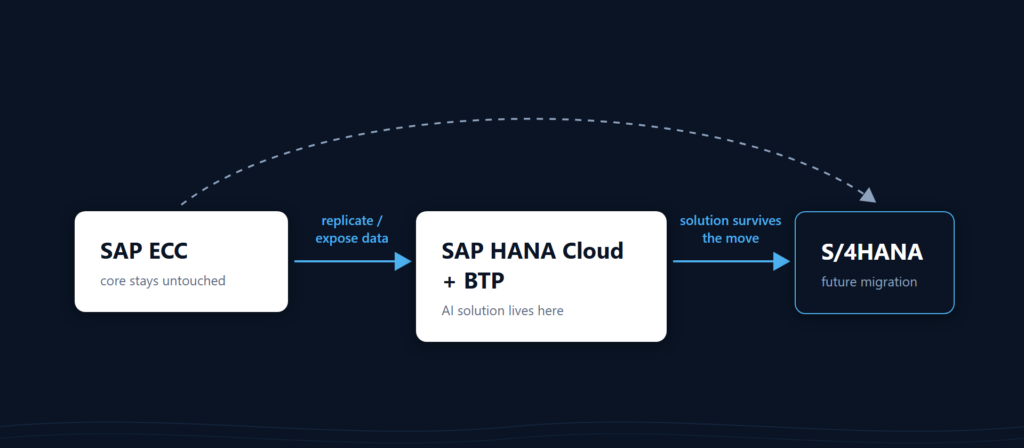
The working pattern is side-by-side. Replicate or expose the relevant data outside the core, for example into SAP HANA Cloud, and build the AI solution there instead of against ECC directly. The solution talks to a data layer and to APIs, and does not care which ERP release sits behind them. That detail matters more than it first appears: an agent or application built this way has a good chance of surviving the eventual move to S/4HANA intact, while anything wired into ECC internals will not. Done properly, the AI work becomes an early installment on the migration rather than another thing the migration will break.
Where to start
A mixed landscape sounds like more decisions, but in practice it means one: which piece first. Start from a use case, and name what it actually is: an assistant you activate, an agent you build, a workflow you orchestrate, or an application you develop. That single act of naming usually collapses the option space from five routes to two. And for first deployments of exactly these building blocks, partner-led funding options currently exist and are worth checking before any budget conversation.
In the coming parts of this series we will take the routes one at a time: what the SAP Business AI Platform actually is, what Joule Studio can and cannot do today, what building on AI Core taught us, where AI genuinely helps in integration operations, and how the outside-the-stack options compare.
At Sygeon we hold the SAP Business AI Platform Expert competency, the highest tier of SAP’s partner competency framework, and we work across every route on this map, including the ones that leave SAP territory. If you are deciding which door to walk through, reach out and we will guide you through it.